It’s possible to chain different api fetches together. This is useful when a second api call would depend on the
results of the first.
Warning
By default, all subsequent requests will be skipped if parent one fails. Although, it is possible
to configure this behavior by making link optional. More details
Available chaining options
NB! Chaining options supported through value AND through data-preset-val parameters
Every request input parameters may be chained with other request and with data from GoErp in-build data sets.
In-build data sets:
Session (check structure of the Session by printing it out {{ toJson .Session }})
We can use the grouping definition to set the order of calls.
The pipe | at the end indicates grouping and the number says the order.
Multiple requests can have the same group number, this means they would be done at
the same time, and they do not depend on each other.
It is recommended to make as few requests as possible. This means that creating requests in first api response
loops is not recommended as it would take a large performance hit.
Instead, we can use special helper functions to collect the id’s and make a separate calls.
|@commaSepStr converts all the id’s of the get products response to comma separated string input for the pricing api.
Then we assign this value to productId parameter using the <- sign.
The value syntax here is similar to how the Get function works, so we can also assign single values when needed.
<!-- Add the id value of the first result --><inputtype="hidden"name="PricingApi.Api.Query.getPrices.<-productIDs"value="getProducts.Response.0.id">
Make chained link optional
Dynamics provides option to make link optional, which means, if parent request fails or there is no
data in chained location then request would be still executed but with empty parameter (from version 1.262.1: query, path and headers parameters will be skipped instead of empty values).To make link
optional just put ? after the link operator <-, like this <-?:
Dynamics provides option to skip the chain when parent has a value. That option could be useful
when we need to create a new record only if the parent request has no data. To skip the chain,
put ! after the link operator <-, like this <-!:
<!-- getPrices would be not executed if getProducts.Response.0.id has id in there --><inputtype="hidden"name="PricingApi.Api.Query.getPrices.<-!productIDs"value="getProducts.Response.0.id">
Define multiple sources for chaining
Sometimes we need to get first non-empty value from multiple sources. This can be done by using the
|| operator between sources. This will take the first non-empty value from the provided set of
sources. If all sources are empty and chain not optional, then request will be not executed. Works
with presets as well.
We can use the json query mechanism to get items from other api responses, or we can use the old-fashioned
id matching.
Query features
Using the inbuilt query features to return exact values. This can be useful when dealing with more complex
pages that try to compose multiple requests.
<ul>{{ range .Data.PIMApi.Api.Requests.getProducts.Response.Array }}
<!-- As values returned by the _Get_ function do not have a specific type we need to cast it into one --> {{ $productId := (.Get "id").Int }}
<li> Product code: {{ .Get "code" }}<br><!-- Get the price_with_tax value from the prices array by matching the productID there with current iteration id --> Price: {{ .Data.PricingApi.Api.Requests.getPrices.Response.Get (printf `#(productID==%d).price_with_tax` $productId) }}
</li>{{ end }}
</ul>
Id matching
Iterating through the second set is also an option. For something smaller this will probably be enough.
<ul>{{ range $product := .Data.PIMApi.Api.Requests.getProducts.Response.Array }}
<li> Product code: {{ $product.Get "code" }}<br> {{ range $price := $.Data.PricingApi.Api.Requests.getPrices.Response.Array }}
<!-- Still need to cast to the appropriate types --> {{ if eq ($price.Get "productID").Int ($product.Get "id").Int }}
<!-- Get the price_with_tax value if the id matches --> Price: {{ $price.Get "price_with_tax" }}
{{ end }}
{{ end }}
</li>{{ end }}
</ul>
Sample
In here we fetch a list of products and generate a list of images for them.
<divclass="my-error-container"> {{ range .Data.Errors }}
<spanclass="my-error-message">{{ . }}</span> {{ end }}
</div><inputtype="hidden"name="PIMApi.Api.Get.getProducts"data-preset-val="v1/product"><inputtype="hidden"name="PricingApi.Api.Get.getPrices|1"data-preset-val="v1/products/price-tax-rate"><inputtype="hidden"name="PricingApi.Api.Query.getPrices.warehouseID"data-preset-val="1"><inputtype="hidden"name="PricingApi.Api.Query.getPrices.<-productIDs"data-preset-val="getProducts.Response.#.id|@commaSepStr"><ul> {{ range .Data.PIMApi.Api.Requests.getProducts.Response.Array }}
<!-- As values returned by the _Get_ function do not have a specific type we need to cast it into one --> {{ $productId := (.Get "id").Int }}
<li> Product code: {{ .Get "code" }}<br><!-- Get the price_with_tax value from the prices array by matching the productID there with current iteration id --> Price: {{ $.Data.PricingApi.Api.Requests.getPrices.Response.Get (printf `#(productID==%d).price_with_tax` $productId) }}
</li> {{ end }}
</ul>
A more complex sample
This is a more complex sample that uses multiple api calls to save a new customer and various other
elements related to the customer.
Errors: {{ .Data.Errors }}<br/><h1>Customer input with address and fetching customer with all data in place</h1><formmethod="post"><!-- requests initialization --><inputtype="hidden"name="CRMApi.Api.Get.customerGroups"value="v1/customers/groups"data-preset-val="v1/customers/groups"><inputtype="hidden"name="CRMApi.Api.Post.createCustomer"value="v1/customers/individuals"><inputtype="hidden"name="CRMApi.Api.Post.createAddress|1"value="v1/addresses"><inputtype="hidden"name="CRMApi.Api.Get.customer|1"value="v1/customers"><inputtype="hidden"name="CRMApi.Api.Get.getAddress|2"value="v1/addresses"><inputtype="hidden"name="CRMApi.Api.Put.createAttribute|2"value="v1/attributes"><inputtype="hidden"name="CRMApi.Api.Delete.delAttribute|3"value="v1/attributes/{id}"><inputtype="hidden"name="CRMApi.Api.Get.getAddressTypes|3"value="v1/addresses/types"><inputtype="hidden"name="CRMApi.Api.Get.getBusinessAreas|3"value="v1/business/areas"><inputtype="hidden"name="CRMApi.Api.Get.getAttributes|4"value="v1/attributes"><!-- presets data --><inputtype="hidden"name="CRMApi.Api.Query.customerGroups.take"value=""data-preset-val="50"><!-- customer post, depth = 1 --><br/>First name:
<inputtype="text"name="CRMApi.Api.Json.createCustomer.string.firstName"value="{{ .Data.CRMApi.Api.Requests.customer.Json.Get "firstName"}}"><br/>Last name:
<inputtype="text"name="CRMApi.Api.Json.createCustomer.string.lastName"value="{{ .Data.CRMApi.Api.Requests.customer.Json.Get "lastName"}}"> {{ $gId := (.Data.CRMApi.Api.Requests.customer.Json.Get "customerGroupId").Int }}
<br/>Group: <selectname="CRMApi.Api.Json.createCustomer.number.customerGroupId"> {{ range $cg := .Data.CRMApi.Api.Requests.customerGroups.Response.Array }}
<optionvalue="{{ $cg.Get "id"}}"{{ifeq($cg.Get"id").Int$gId}}selected{{end}}> {{ $cg.Get "name.en" }}
</option> {{ end }}
</select><!-- address post, depth = 2 --><br/>Address street:
<inputtype="text"name="CRMApi.Api.Json.createAddress.string.street"value="{{ .Data.CRMApi.Api.Requests.createAddress.Json.Get "street"}}"><inputtype="hidden"name="CRMApi.Api.Json.createAddress.number.<-customerId"value="createCustomer.Response.id"><inputtype="hidden"name="CRMApi.Api.Json.createAddress.number.typeId"value="1"><!-- get created customer, depth = 2 --><inputtype="hidden"name="CRMApi.Api.Query.customer.<-ids"value="createCustomer.Response.id"><!-- get created address, depth = 3 --><inputtype="hidden"name="CRMApi.Api.Query.getAddress.<-customerIds"value="customer.Response.#.id|@commaSepStr"><br/>Attribute int:
<inputtype="number"name="CRMApi.Api.Json.createAttribute.number.value"value="int"><inputtype="hidden"name="CRMApi.Api.Json.createAttribute.string.entity"value="customer"><inputtype="hidden"name="CRMApi.Api.Json.createAttribute.string.name"value="test-dynamic-4"><inputtype="hidden"name="CRMApi.Api.Json.createAttribute.string.type"value="int"><inputtype="hidden"name="CRMApi.Api.Json.createAttribute.number.<-record_id"value="customer.Response.#.id|@commaSepStr"><!-- get created address, depth = 4 --><inputtype="hidden"name="CRMApi.Api.Path.delAttribute.<-id"value="createAttribute.Response.id"><inputtype="hidden"name="CRMApi.Api.Query.getAttributes.entityName"value="customer"><inputtype="hidden"name="CRMApi.Api.Query.getAttributes.<-recordIds"value="customer.Response.#.id|@commaSepStr"><br/><buttontype="submit">Submit</button></form><h1>Created customer</h1>{{ $cs := .Data.CRMApi.Api.Requests.customer.Response.Array }}
{{ if $cs }}
<br/>Response count: {{ len $cs }}
{{ $c := index $cs 0 }}
{{ $cId := ($c.Get "id").Int }}
<br/>ID: {{ $cId }}
<br/>First name: {{ $c.Get "firstName"}}
{{ $cgId := ($c.Get "customerGroupId").Int }}
<br/>Customer group: {{ .Data.CRMApi.Api.Requests.customerGroups.Response.Get (printf `#(id==%d).name.en` $cgId) }}
<br/>Addresses: {{ $.Data.CRMApi.Api.Requests.getAddress.Response.Get (printf `#(customerId==%d)#.street` $cId) }}
{{ end }}
<h1>Attributes</h1>{{ $attrs := .Data.CRMApi.Api.Requests.getAttributes.Response.Array }}
{{ if $attrs }}
{{ range $attrs }}
<br/>{{ .Get "name" }} | {{ .Get "type" }} | {{ .Get "value" }}
{{end}}
{{ end }}
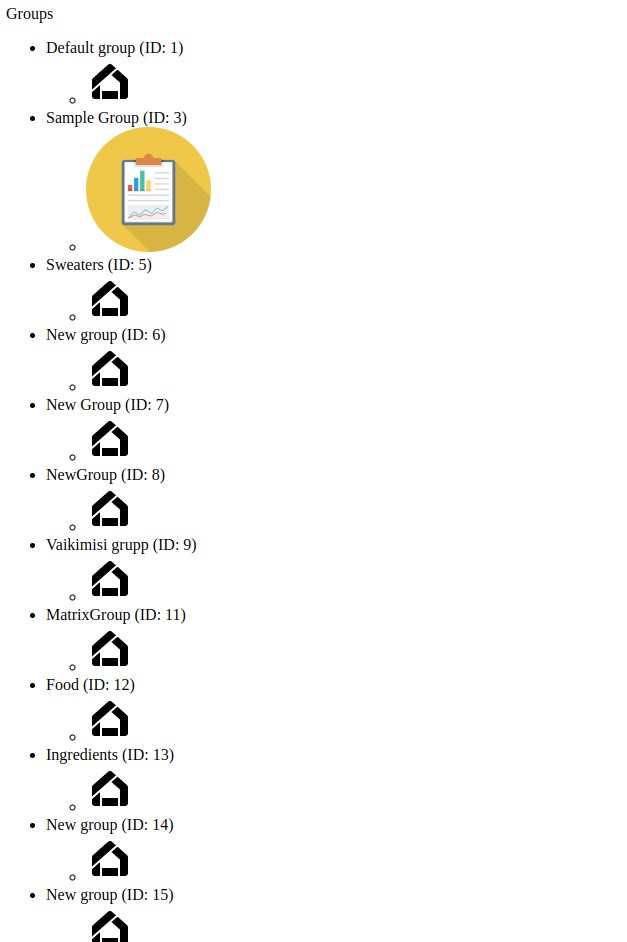
A sample using chaining in reading images
A sample where we connect CDN images to product groups.
In here we can see that we can connect items that naturally do not have a connection in the database.
Before this sample 2 images have been created using the CDN api create image endpoint.
context: erply-product-group
productId: 0 for default and 3 for the existing one
<!-- Define request 1 for product groups --><inputtype="hidden"name="PIMApi.Api.Get.myProdGroups"value="v1/product/group"data-preset-val="v1/product/group"><!-- Chain images from CDN api, use results from first as input --><inputtype="hidden"name="CDNApi.Api.Get.myImages|1"value="images"data-preset-val="images"><inputtype="hidden"name="CDNApi.Api.Query.myImages.context"data-preset-val="erply-product-group"><inputtype="hidden"name="CDNApi.Api.Query.myImages.<-productId"data-preset-val="myProdGroups.Response.#.id|@commaSepStr"><p>Groups</p><ul> {{ range .Data.PIMApi.Api.Requests.myProdGroups.Response.Array }}
{{ $groupId := (.Get "id").Int }}
<li> {{ .Get "name.en" }} (ID: {{ $groupId }})
<!-- Fetch images for this group id using the dynamic query method --> {{ $images := $.Data.CDNApi.Api.Requests.myImages.Response.Get (printf `images.#(productId==%d)#.key` $groupId) }}
<ul> {{ if $images.Array }}
<!-- print matching items --> {{ range $images.Array }}
<li><imgsrc="{{ $.Session.Services.CDNApi.URL }}/images/{{ $.Session.ClientCode }}/{{ . }}?width=200&height=200"></li> {{ end }}
{{ else }}
<!-- Print default --><li><imgsrc="{{ $.Session.Services.CDNApi.URL }}/images/{{ $.Session.ClientCode }}/jJumxcXTSamiGhJgDGJ1kGFyQx4iqtksv4R3MnEsIc4APVqt2v.png?width=200&height=200"></li> {{ end }}
</ul></li> {{ end }}
</ul>